Claude Code is Anthropic's AI that builds software: you describe what you want, and it plans, writes the code and runs it on your computer. You can use it without knowing how to code, but it is made for developers, so Crew by FIFT wraps it in a Mac app with a Chief, a plan, a live board and a Touch ID yes before anything goes out. Your own AI crew builds it with you, on your Mac.
Free for one company · on your own AI plan · Apple silicon Mac
What Claude Code is
Anthropic describes it as "an agentic coding tool that reads your codebase, edits files, runs commands, and integrates with your development tools." (Claude Code docs, read 14 Nov 2026)
In plain words:
- It works on your files. It reads the project on your computer and changes it.
- It runs things. It can start the app it built and run its tests.
- It plans first. "Describe what you want and it plans, writes code, runs tests, and opens pull requests." (Claude Code product page, read 14 Nov 2026)
- It is built for software work. Anthropic says Claude Code "is built for software engineering," and points other work to Cowork. (Cowork page, read 14 Nov 2026)
Can you use Claude Code if you don't code?
Yes. You talk to it in plain words, and it writes the code.
What makes it hard is everything around the talking. Its home is the terminal, the text window developers type commands into. Anthropic's install page starts with a command to paste into one, and links a terminal guide "if you haven't used a terminal before." (Claude Code docs, read 14 Nov 2026)
Its words are a developer's too: codebase, commits, pull requests. You will meet them on the first day.
Is there a Claude Code app for Mac with no terminal?
Yes, from Anthropic itself. The Claude desktop app for Mac has a Code tab. Anthropic says "the app includes Claude Code, so you don't need to install the CLI separately," and that "a paid subscription is required." It runs on Intel and Apple silicon Macs. (Claude Code docs, read 14 Nov 2026)
There is also Claude Code on the web, at claude.ai/code, with nothing to install.
Crew is another Mac app for Claude Code, made for founders rather than developers. The difference is below.
What it costs
| Claude plan | Claude Code |
|---|---|
| Free | Not included |
| Pro | Included |
| Max | Included |
| Ultra | Included |
From Claude pricing and the Cowork page, read 14 Nov 2026; their prices are on Anthropic's own page. Usage limits apply. Claude Code also works with a Claude Console account, which pays per use at API prices.
Crew adds nothing to your Claude bill: it runs on your own plan. Crew itself is free with one company. The Founder plan is $50/mo for the first 100 founders, locked for life while you stay a member, then $79. Tax is added at checkout. (Crew pricing)
What gets in the way
These are the parts of AI coding tools in general that a non-coder meets first. We name no product, and they are what we built Crew around:
- You have to make the plan, then tell it to start.
- The work hides in a long chat. You cannot see what is happening.
- A risky step needs a pile of clicks before it can go.
- Every new chat forgets what you decided.
- Your plan runs out mid-work.
What Crew adds
Crew runs Claude Code on your Mac, signed in as you, and puts a small company around it.
| You want | Claude Code alone | With Crew |
|---|---|---|
| Someone to plan the work | You plan, it builds | Your Chief plans with you and runs the workers |
| To see the work | A chat, or diffs in the desktop app | A live board shows the work while it happens |
| To stay safe | Permission modes and rules you set | Money, posts and going live wait for your Sign with Touch ID |
| To be remembered | Memory files and auto memory | Your Chief arrives with your memory and skills |
| More than one job at once | Parallel sessions | Workers build side by side, each in its own copy |
| A company, not only code | Code | Each company gets its own board, goals and money |
| To go back | Your own tools | Go back to before any turn; redo, too |
The Claude Code column is from Anthropic's docs and product page, read 14 Nov 2026. The Crew column is from Crew by FIFT and How it works.
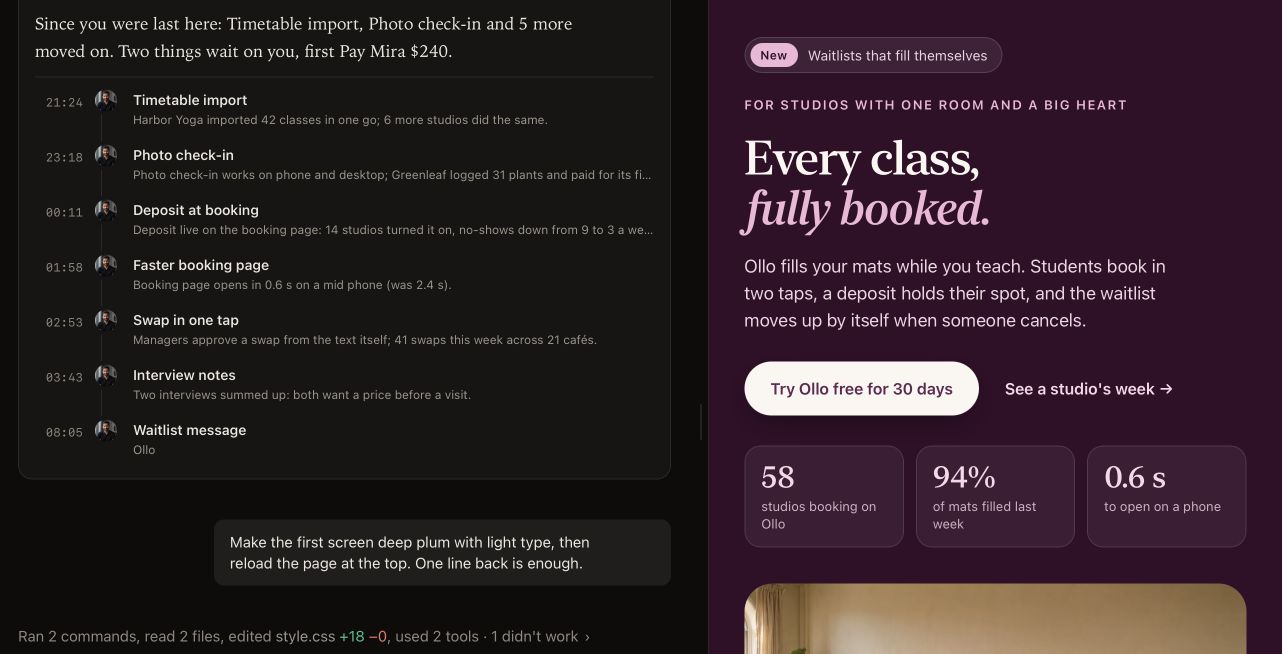
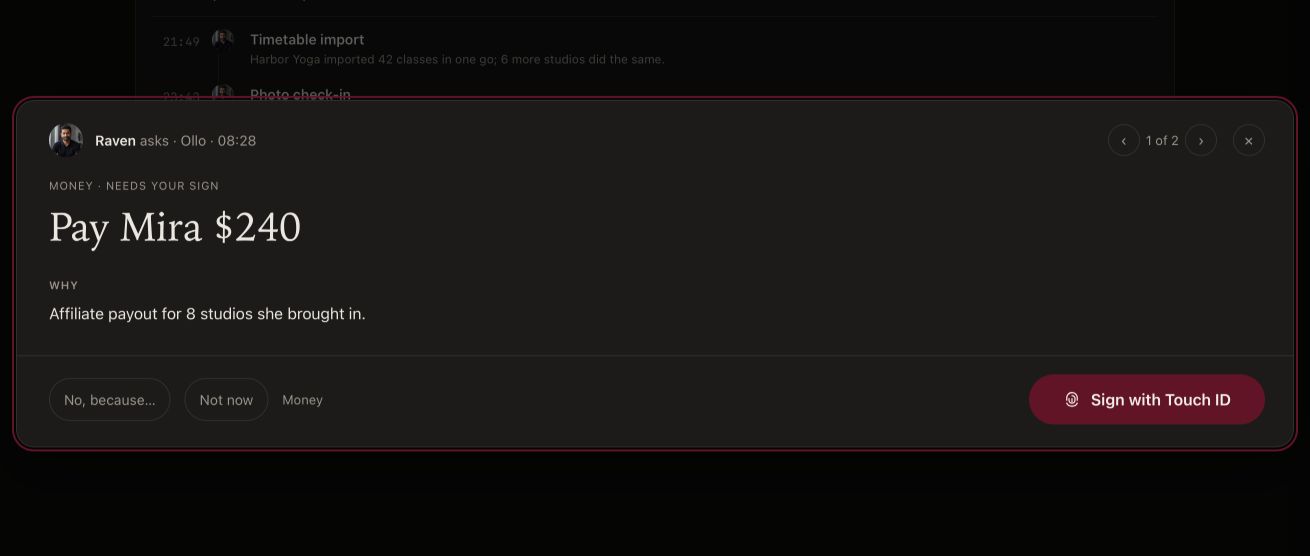
Ollo is a demo company, run by FIFT’s own crew; no one starts with our crew. Every screen here is the real Crew app, with sample data.
What Crew does not add, and where plain Claude Code is better
- Windows and Linux. Claude Code works on macOS, Linux and Windows (Claude Code docs, read 14 Nov 2026). Crew needs an Apple silicon Mac with macOS 14.0 or later.
- Your phone and the cloud. Claude Code can run in the browser and keep working from your phone (Claude Code product page, read 14 Nov 2026). Crew runs on your Mac; Crew Cloud is planned for a later plan with no price yet.
- The most from your plan. On our own test of Crew 0.6.19 on 7 Nov 2026, plain Claude Code used 29,948 plan-weighted tokens per solved task against Crew's 33,622: about 11% less of a Claude plan. Both solved 16 of 16. (How Crew is measured, 7 Nov 2026)
- A developer's setup. If you already live in a terminal, an editor, GitHub and your CI, Claude Code fits in there. Crew is not built for that.
How to start, either way
Claude Code alone, with no terminal:
- Get a paid Claude plan, Pro or above.
- Download the Claude desktop app for Mac and sign in.
- Click the Code tab.
- Say what you want.
Claude Code with Crew:
- Download Crew and drag it into Applications.
- Continue with FIFT and give your Chief a name.
- Connect Claude: Crew walks you through it.
- Tell your Chief what you want, in one sentence.
- Watch your crew work, and say yes when it asks.
Four words you will meet
- Terminal: a window where you type commands instead of clicking.
- Repository: a project's folder of code, with its history.
- Commit: a saved step in that history.
- Pull request: a proposed change, waiting to be read and accepted.
With Crew, your crew does the work, code included, and a live board shows each step while it happens.
Who should use which
- Use Claude Code alone if you are learning to code, you use Windows or Linux, you want the most out of a small plan, or you want one thing built and are happy to steer.
- Use Crew if you don't code and want to build and run a company: a Chief who plans and remembers, a crew that builds, and nothing going out without your yes.
Crew was built by a founder who started where you are. "In January I couldn't write a single line of code," Sunny Singh wrote. (Why I built Crew)