- Stays on your MacYour companies and conversations live on your Mac.
- Your own AI planUnder your provider’s terms. We never receive what you send.
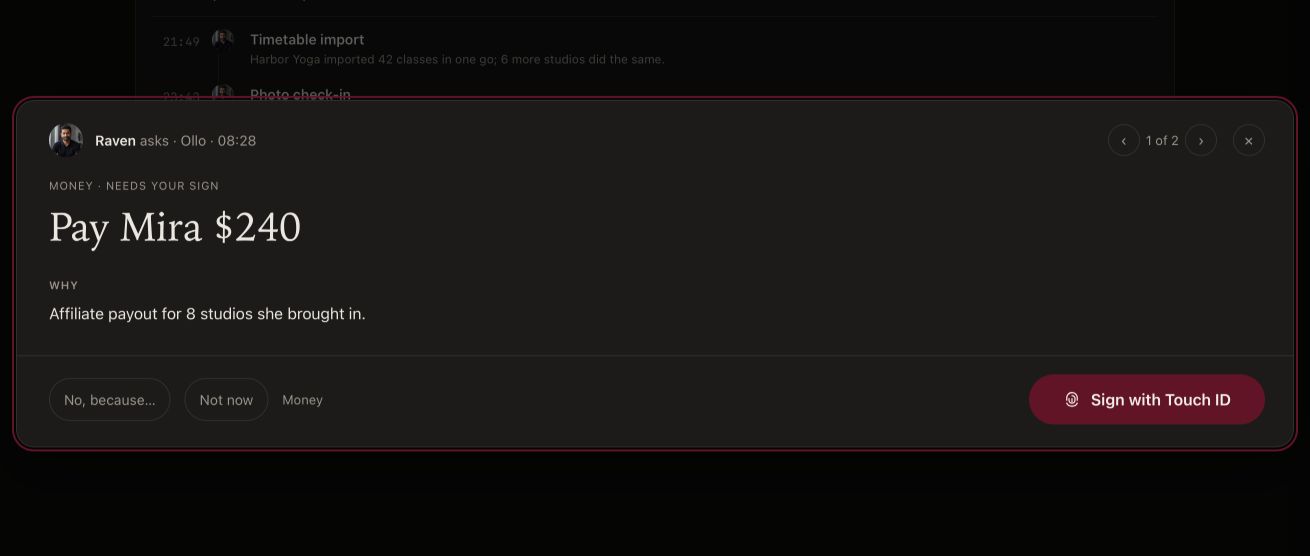
- Four things always wait for youMoney, posts and messages, going live and Crew’s own records. In every mode.
- Signed by us, checked by AppleEvery release and update. Team ID 6AF366MN3R.
- Every update can be rolled backBack to the version before, if one doesn’t suit you.
- Tell us firstFound a problem? Email sunny@fift.studio.
The details.
For when you want the whole story.
Your work stays on your Mac
Your companies, conversations and your Chief’s work stay on your Mac; we don’t collect them into Crew’s website or membership service. Crew’s helper, which keeps your crew’s records, runs on your Mac while you’re logged in.
When your Founder plan ends, you return to the Free plan; your work stays on your Mac, and Crew never deletes it. Deleting your online account doesn’t erase files on your Mac.
What leaves your Mac, and why
- What your Chief sends your AI providers. Your requests and project content go from your Mac to the AI provider you connect (today Claude, by Anthropic), under your own account and their terms. They aren’t our service providers, and we don’t receive what you send them.
- Your membership check. To check that a membership belongs to your Mac, Crew uses a key created on your Mac; its private part never leaves the Mac. We store a one-way fingerprint of its public part, the Mac model (for example “Mac14,2”), the macOS version, and when we first and last saw it. Crew doesn’t read or send hardware identifiers such as serial numbers.
- Update checks. Your Mac asks our update server whether a newer version exists. Like any website visit, that server sees your IP address and which version you have; we use this only to deliver updates.
- Your FIFT account. You sign in with a FIFT account (one account for every FIFT Studio app). It holds your email address and the account details you give it. If you add people to your studio, their membership lives in your FIFT account too.
- Things you choose to send. For example a post you approve for X, or an email to support.
Crew sends us no crash reports and no usage data. When you ask for help, Crew shows you its diagnostics first, and they reach us only if you send them from your own mail app. Read the Privacy Policy for the full account, payment and retention details.
Full Disk Access, and what it reads
Setup asks once for Full Disk Access, so your Chief can open the files and folders you work with anywhere on your Mac, not only inside Crew. What it reads stays on your Mac; your Chief sends a file’s content only to the AI provider you connected, and only when it needs it for your work.
You can turn it off any time in System Settings › Privacy & Security › Full Disk Access.
Nothing risky runs without your Allow, until you turn on God mode
From the first run, your Mac has its own approval key, kept in its Secure Enclave. When you press Allow, your answer is signed with that key, and Crew checks the signature before anything runs. How approvals work
Signed by us, checked by Apple, reversible
Every Crew release since 0.2.3 is signed with our Apple Developer ID (Team ID 6AF366MN3R) and checked by Apple (notarized) before distribution. Updates arrive through a signed update feed, and Crew checks each update’s signature before installing it.
If an update doesn’t suit you, a signed revert takes you back to the version before it. If the newer version changed your data, your Chief helps restore your copy.
If macOS ever says it can’t verify Crew, or reports damage or malware, don’t open that copy and email sunny@fift.studio. Don’t turn off macOS’s protections to get past the message.
Sharing your screen
Presenting covers Crew’s own windows. Other apps on your screen show as they are. Before a stream, check what you have marked public and clear Notification Center. If you show a terminal on stream, viewers can see everything it prints, keys included. Read the Presenting guide
Report a security problem
If you think you’ve found a security problem in Crew, email sunny@fift.studio with “Security” in the subject, and please don’t post the details publicly until we’ve replied. Our security.txt has the same contact.
Never send us a password, an API key, a sign-in code or a card number. We never ask for them, and nobody from Crew will.
Ready when you are.
Apple silicon Mac · macOS 14.0 or later